Description

Live Chat: Discord.
Get the latest builds: Patreon.
Get Mods here: Reddit.
Public Version for Heroine Rescue Team (v0.51): Here.
Download for Heroine Rumble is at the Heroine Rumble page.

Tuesday, October 30, 2018

V4.8.2 MOAR FIXES

Patreon LINK.

Changelogs:

    - added another check to floor the EXP numbers when using reset_potion
    - fixed the trade item display bug that shows sell price to be 25% (bugged) instead of 20% (correct)
    - units placed on devices now have an "invulnerable" tag - I believe this is the cause for several crashes
    - fixed a crush when AI decides to grab an enemy that is in the selfH animation
    - reduced lewd gas damage by ~1/3
    - "lunge" ability preptime increased from 0.4s to 0.6s
    - fixed an animation flag not set properly, causing several animations to be off the mark. Noteably, boob_fondle
    - updated the pathfinding portion of AI somewhat - this should help against several keep running at a wall/ not moving things when the target is placed on a device
    -       this issue here is that the tiles the device is on is marked not traversable which cause the pathfinding to not return a path

Also added an appendix to the modding guide that includes ids for game items and some additional references. You can take a look in the google doc HERE.

It is also replicated below in case something happens to the google doc:

UIDs as of v4.8.2

Traps:

  • “trap_spike”
  • “trap_tripwire”

Devices:

  • “wooden_horse”
  • “pillory”
  • “cross”
  • “pole_hook”
  • “wall_hole”
  • “cage”


Equip Slots:

  • “head” (the equipment)
  • “top”
  • “bot”
  • “arm”
  • “feet”
  • “back”
  • “weapon”
  • “hair”
  • “tail”
  • “unit_head” (the head mesh itself)
  • “unit_body”
  • “unit_penis”


Hair Ids:

  • Use the “hair_change” item in game

Body Ids:

  • “female_body”
  • “male_body”
  • “goblin_body”
  • “goblin_body2”

Unit Head Ids:

  • “female_head”
  • “male_head”
  • “goblin_head”

Item Ids:

  • Refer to data/_base/item_data.json

Tail Ids:

  • “kitty_tail”
  • “wolf_tail”

Flask Ids:

  • “gas_flask”
  • “flash_flask”
  • “impact_flask”

Unit sliders (the [“appearance”][“sliderValues”] parameter) :


  • Refer to “customize body shape” option in game, although those are names rather than ids, but it should be easy to map which is which:


    • “height”
    • “build”
    • “head_size”
    • “butt_shape”
    • “hip_size”
    • “waist_size”
    • “waist_len”
    • “boob_size”
    • “torso_size”
    • “shoulder_width”
    • “arm_thick”
    • “arm_len”
    • “hand_size”
    • “leg_length”
    • “hip_sep”
    • “thigh_size”
    • “leg_size”
    • “feet_length”
    • “feet_width”


  • There is also “size” under [“appearance”] which is just an overall size/scale of the unit. Eg. 


“appearance”: {
        "size": 0.95,
        "sliderValues": {
            "build": [1.0, 1.1],
            "head_size": [1.0, 1.2],
            "height": [0.77, 0.87]           
        }
}

AI abilities:

  • “pounce”
  • “cast_curse”
  • “place_trap”
  • “lunge”

Some stats of existing enemies for reference: (again, as of v4.8.1)
Bandit:
     "stats": {
        "HP": 25,
        "SP": 35,
        "TP": 0,
        "MSPD": 0.7
    },

Ludas:
    "stats": {
        "HP": 450,
        "SP": 50,
        "TP": 200,
        "MSPD": 0.9,
        "CHA": 5,
        "STAGGER": 70,
        "UNIQUE": 1
    },

Barbarian:

    "stats": {
        "HP": 150,
        "SP": 80,
        "TP": 50,
        "MSPD": 1.02,
        "UNIQUE": 1,
        "MIG": 3,
        "DEX": 2
    }

Goblin Fodder:

     "stats": {
        "HP": 20,
        "SP": 40,
        "TP": 0,
        "MSPD": 1.15,
    },

Knight (futa):

     "stats": {
        "HP": 50,
        "SP": 60,
        "TP": 0,
        "MSPD": 1.05,
        "MIG": 5,
        "CON": 15,
        "STAGGER": 20
    },

Saturday, October 27, 2018

Dungeon Modding Tutorial


As stated previously, I want to give a guide/tutorial on unit/dungeon modding. Here it is. I finished the draft in the morning and then I was occupied with some administrative stuff in the afternoon, so the guide might be a bit rough on the edges. But then I think the unit/dungeon modding is something that quite a few people are interested in doing, so I decided to release it now.

NOTE: THIS REQUIRES V4.8.1
Here is the complementary example dungeon mod with it's own unique units and items: Here. 
Below is the guide in case something happens to the google doc. WARNING: VERY LONG. 
V4.8.1 introduced unit and dungeon modding. I think this is a very powerful addition to the game. People have different tastes and they might prefer different kind of gameplay. Some may want to feel powerful and bulldoze their way through waves of weak enemies, others may have a distaste for hordes and want fewer, but tougher enemies, and there may even be others who want near impossible dungeons only to watch the hero/heroines to meet their bad end. Suffice to say, it is very difficult for me to address the needs of all, and fortunately, I don’t have to do it alone. With Unit and Dungeon modding, it is now possible for the community to create the kind of experience they are interested in, and I do hope this feature get used.
PART I: JSON CRASH COURSE
Like all previous modding feature, the unit and dungeon modding is done through (creating and) editing .json files. I think many people had some difficulties with getting the JSON syntax right so it might be worthwhile to include a short guide on JSON:
Essentially, JSON file is made up of three components: Values, Lists ([]) and Mapping ({}).
Value can be thought of as data. So things like numbers: 1, 2, 5.23, 3.14, and strings (letters/words): “apple”, “id”, “etc”. Note that the strings are enclosed with “ “ parentheses. This is because 1 and “1”, although both are Values, are not the same thing to the computer.
A List is an ordered collection of values enclosed by square brackets ([ ]). Something like this: [1,2,3,4,5] or [“a”, “b”, “c”, “d”]. Note that each value is separated with a comma (,) and there is no comma on the last value: [1,2,3] and NOT [1,2,3,]. This is a very common source of bugs.
A Mapping is an unordered collection of Key-Value pairs enclosed by braces ({ }). Something like this: {1:”a”, 2:”b”, 3:”c”}. Note that each data point is a pair separated by colon (:) that represents a relationship. Note the last elem doesn’t have a comma either.
Remember what I said about Values being data such as number and letters? Well, I kinda lied. Because collections, such as Lists ([]) and Mapping ({}) are values as well. And you can chain them together. For example: A List of List: [[1,2,3],[4,5,6]], a Mapping of Lists: {1: [“a”,”b”], 2: [“c”,”d”]} or whatever else you can come up with.
And so that concludes the crash course on JSON. If you are getting JSON parsing failed errors, it is recommended that you copy and paste the JSON into a validator such as this one: https://jsonlint.com/. It will give you much nicer messages on where the error occured.
PART II: UNIT MODDING
Now, onto the actual Modding portion. To make things easier, I provide a complementary dungeon mod with it’s own unique enemies. You can download it >>HERE<<.
The first change that you might noticed is that the _FilesToLoad.json now supports loading of “unitFiles” and “dungeonFiles.” As you might have guessed, they are used to define new unit types and new dungeons.
Let’s start with “unitFiles.” Under _FilesToLoad.json, you see that the “unitFiles” is pointing to a List of unit files to load. And there is only one unitFile to load in this particular mod, “unit_data.json.” 
When you go back to the mod folder, and indeed, you will find a json file named “unit_data.json.” Open it.
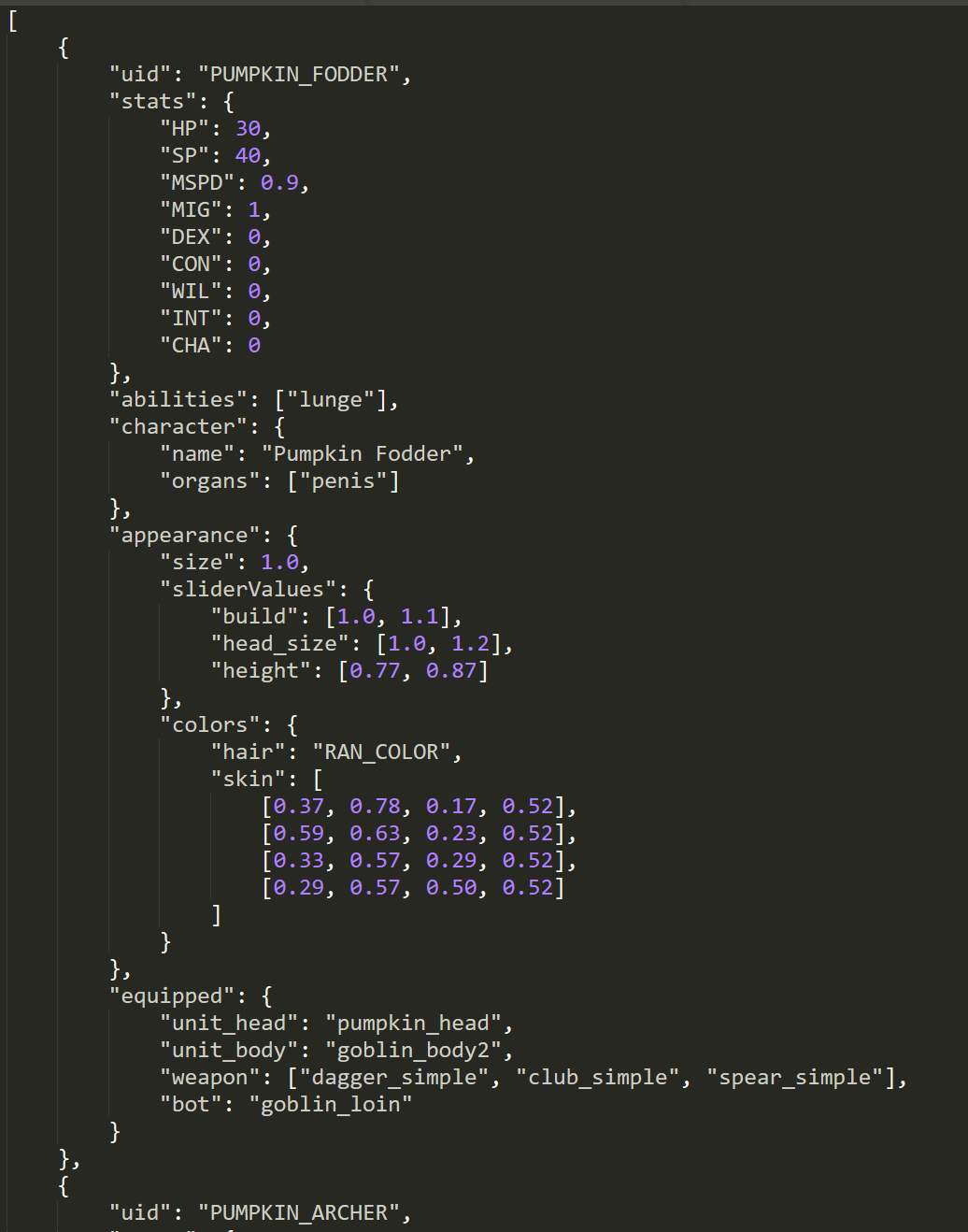
It may look something like this:
( Opened via Sublime Text )
Now, now, before you panic, take a deep breath and trying to remember what we learned about JSON. The first symbol you see is [ and it should immediately tell you that it is a List of something. If you go to the end of the file you will see the matching ending ] that marks the end of the List. In between, it’s a lot of something, what do they all mean?
Remember that a List is a sequence of Values that is separated by comma. It looks something like this: [Value, Value, Value, Value]. Aha! So we just find the next comma and interpret everything in between as the Value? Not quite. Because a Value can be arbitrarily complex and a Value can be another List with commas, so the next comma isn't necessarily THE comma that we are looking for.
A keen reader might notice that the next symbol is { and therefore we expect a Mapping. And he/she might find the ending symbol } at line 43 and take that to mean the end of that Mapping, And hence everything in between the { and } is a Value, of something. 
That would be exactly right. I like to take a moment here to introduce the idea of indentation. It is used here to indicate the end of a collection. This is important because it will help us to find the correct end of a List or Mapping. Don’t believe me? Remove all the spaces and see for yourself.
So now we established that the file is a List of Mapping with the basic structure that looks something like this: [{....}, {....}]. And we see that under each Mapping, contains some key-value pairs that looks like the parameters for an unit. And that would be exactly right.
Let’s go over the parameters:
{ 
“uid”: “YOUR_UNIT_ID”  
}
The most important parameter is the “uid” or the Unique Identification for each unit. This is how other files can refer to the unit data in question. All Units (and anything else, really) must have an UNIQUE identification. Emphasis on UNIQUE. If two mods both define a unit each (so 2 units defined in total) that have the same “uid”, then it means the mods are not compatible with each other. Because they have violated the “uid” uniqueness predicate. My recommendation for this is to always extend the “uid” of your mod by the mod folder name. This is because the mod folder name must be unique, hence it guarantees that the “uid” will be unique as well. (Yes I know I didn't do it for this example mod, this is a situation of “do as I say, not as I do.”)
Next, the “stats” parameter: 
{
"stats": {
       "HP": 30,
       "SP": 40,
       "MSPD": 0.9,
       "MIG": 1,
       "DEX": 0,
       "CON": 0,
       "WIL": 0,
       "INT": 0,
       "CHA": 0
},
...
}
It should be fairly obvious what each of these do, with 2 things to keep in mind: The first is that the HP and SP (stamina) values are the base value before any Stat (like Con) and Equipment takes into effect. The second is that for the Stats themselves, they represent a change from the base stat. So for example, a “MIG” stat of 1 in the data file is actually a might of 11 in game.
The “abilities” tag is a List of all the Abilities that particular unit can do. There are not many abilities implemented in game currently. Just “lunge”, “place_trap” and “cast_curse”. As an example, if you want the unit to do everything, change the line from "abilities": ["lunge"], to “abilities”: [“lunge”, “place_trap”, “cast_curse”].
The “characters” tag represents some misc information regarding the character. If you want to change the “name” of the unit, change the “Pumpkin Fodder” right after “name” to something else. If you want the character to have a penis (perhaps as a futa) add a "organs": ["penis"] line otherwise leave it as empty.
The “appearances” tag contains information regarding the unit’s appearance. It includes thing like overall size, the colors, the individual slider values. I just want to add that the colors are a 4 element list eg, [0.37, 0.78, 0.17, 0.52] representing R,G,B and Smooth channels. And the slider values can either be a single number of a List of 2 numbers, eg [1.0, 1.1]. The list of 2 numbers means a range and the game will randomly take a number within the range.
Next is “aiParems” parameter. (PUMPKIN_FODDER doesn’t have any, PUMPKIN_ARCHER has). This determines what kind of actions the AI is allowed to do. For example, the PUMPKIN_ARCHER can do both “restraint” and “carry” whereas PUMPKIN_FODDER can’t do anything. 
Finally, we have the “equipped” tag to define which items the unit is wearing on each slot. The item Ids must be valid or it will cause a bug. Most likely causing that slot to be invisible / nothing there. A single itemId, like “pumpkin_head”, means that unit will always use that item on that slot. A List of ItemIds, like "weapon": ["dagger_simple", "club_simple", "spear_simple"], means to pick one at random. It is possible to have this random picking to be weighted as well. For example, if you want the unit to use “dagger_simple” much more often than “club_simple,” you can do it by something like this: "weapon": ["dagger_simple", "dagger_simple", "dagger_simple", “club_simple”]. 
If you want a slot to optional, that is, sometimes the unit will use the item, and other times not, you can do so via nulls. For example: "weapon": ["dagger_simple", null]. Note: null is a special variable and there is no “ “ around it!
PART III: DUNGEON MODDING
Now let’s move onto dungeon modding. First of all, a couple of words. The dungeon gen is an very old feature, created near the game’s infancy. The goal back then was to get the game functional ASAP so the dungeon gen is fairly basic. The dungeon modding system uses the same dungeon gen as the game. As such, it is subject to all the limitations. For example, you cannot use it to handcraft an intricate, complex level to play in. It is only capable of generating mazes made up of rooms and hallways.
For the example dungeon, I want there to be 3 different units: a melee enemy, a ranged enemy and a tougher enemy to serve as the boss - the “PUMPKIN_FODDER,” “PUMPKIN_ARCHER” and “PUMPKIN_BOSS” that I created via unit modding. All these unit have an unique feature: they have pumpkins as their heads. To do so, I created a new item, the “pumpkin_head” through the item modding feature that the game had. I place all these dependences, the item “pumpkin_head” mesh data, (/meshes/pumpkin_head.json), the actual item definitions, (/item_data.json) and the unit data (/unit_data.json) all into the same folder. This is so users can just drag this folder into the mod folder and everything will work. Furthermore, when I need to edit the mod in the future, I have everything there for easy reference. 
MODS THAT DO NOT CONTAIN ALL THEIR DEPENDENCIES ARE ILL-FORMED. Unfortunately I don’t have a way to check/enforce this in the game, if I could (perhaps in the future), I will prevent the loading of any mod that fail to meet this basic requirement.
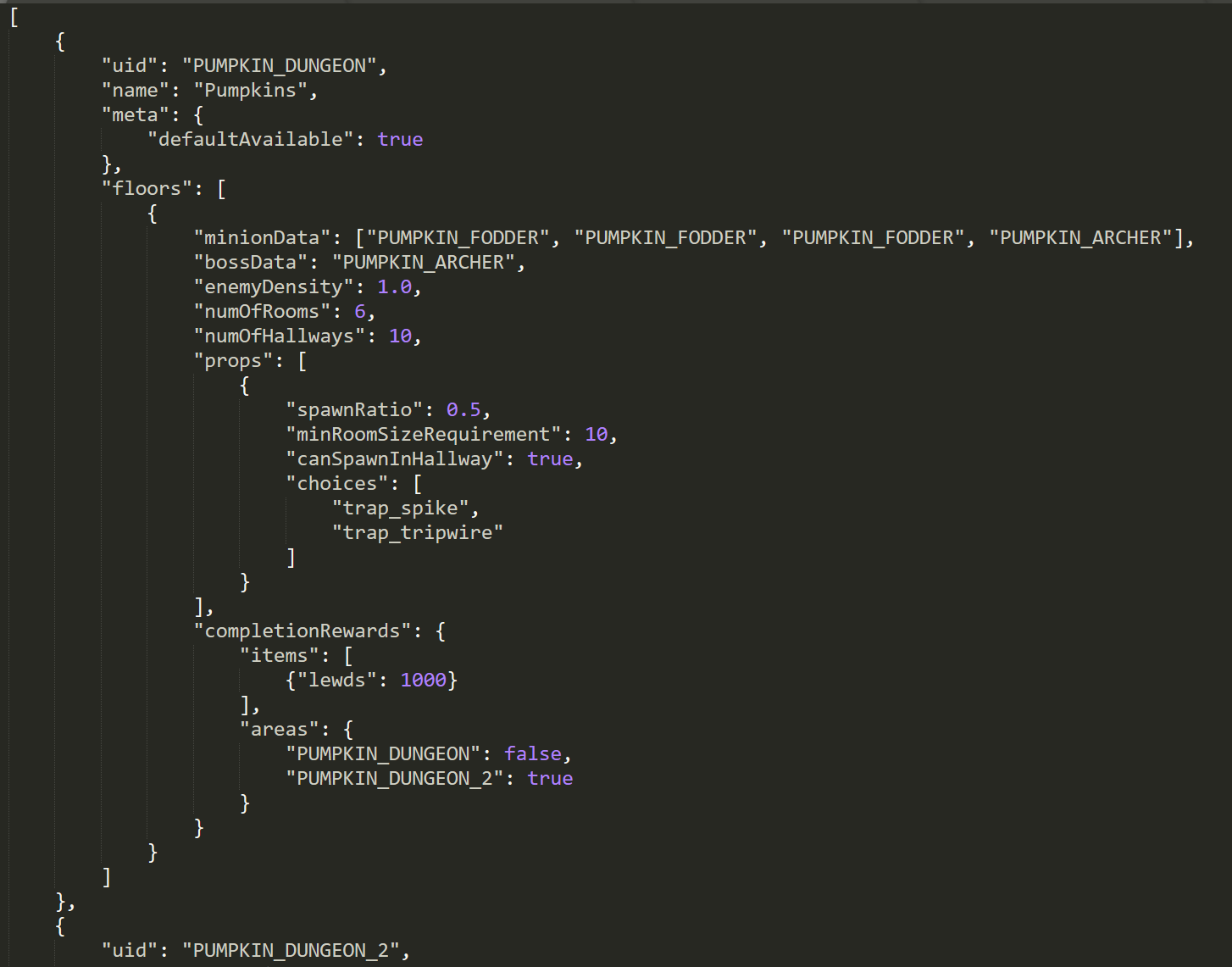
Onto the dungeon data itself, open “dungeon_data.json” and it may look something like this:
It probably should look familiar. It is a List of Mappings again, where each mapping represents a different dungeon. Note that there is “uid” as well, and like units, all dungeons must have their own unique id. And likewise, it is suggested that you prefix this uid with something like the mod folder name to avoid uid collisions.
The “name” parameter is what the game shows when the “where to” prompt shows up, but the “uid” is how the game references to each other internally. Notably, “name” doesn’t have to be unique. It is totally possible to have 2 different dungeons with the same name. This have a couple of applications.
Next under “meta” there is a very important property. The “defaultAvailable” tag. This indicates to the game whether this particular dungeon should be available by default. If this is false or the flag missing, then the player can not access the dungeon until some other thing grants access. 
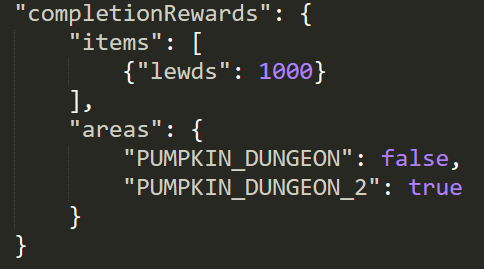
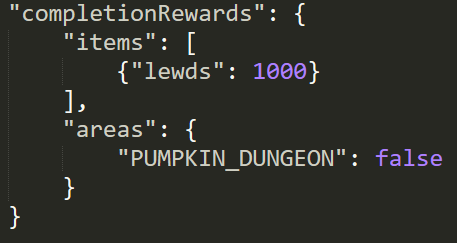
This is useful for things like implementing a series of dungeon floors that the player have to go through in order. This technique is shown in the example mod. “PUMPKIN_DUNGEON” is available by default, but “PUMPKIN_DUNGEON_2” is not. Only when the “PUMPKIN_DUNGEON” is finished, then “PUMPKIN_DUNGEON_2” becomes accessible. At the same time, access to “PUMPKIN_DUNGEON” is closed. This data is set via [“completionRewards”][“areas”]:
Next is the “floors” parameter. The “floors” parameters are what get passed into the dungeon generator to generate the dungeons. It determines the size of the dungeon, what enemies spawn there, the amount of enemies, etc.
Note that the “floors” is a List itself. This is because a dungeon can have multiple floors. And the player must go through them in order. The data is organized like so:
“floors”: [
{
     // floor 1 data
},
{
     // floor 2 data
},
...
]
The “numOfRooms” and “numOfHallways” determines the approximate size of the dungeon. The more rooms and hallways there are, the bigger the dungeon. I dont recommand huge dungeons tho, as the game lacks a map feature and all the rooms/hallways can look very alike, so it’s extremely easy to get lost.
Under “minionData”, is a list of possible enemies. This uses the same random picking process as the equipment data, so you can use it in the same manner to change the frequency of each enemy type. Here, "minionData": ["PUMPKIN_FODDER", "PUMPKIN_FODDER", "PUMPKIN_FODDER", "PUMPKIN_ARCHER"] means that there will much more “PUMPKIN_FODDER”s than “PUMPKIN_ARCHER”s.
The “bossData” is what the enemy you will face in the final or boss room of each dungeon floor.
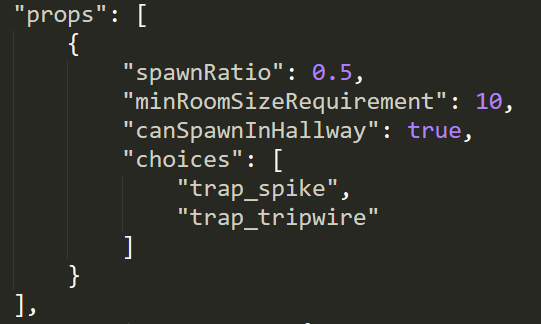
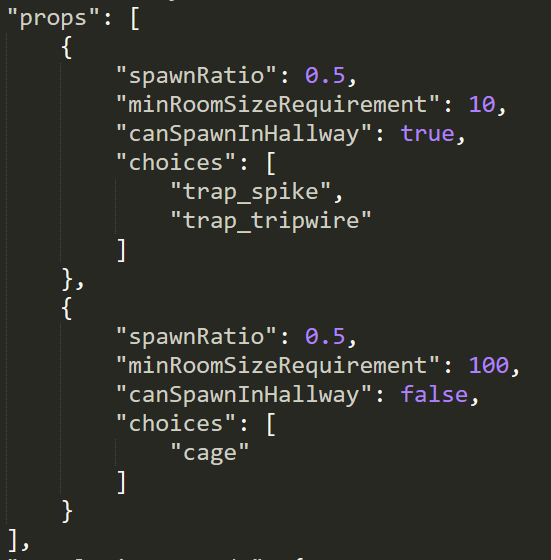
Under “props”, is the parameters for spawning things like Traps and Devices. It is a List ([]) as well. But here, it has a different meaning. It doesn’t mean to pick 1 of these randomly, it means that the dungeon will spawn everything included in the List.
This just spawn traps:
And this will spawn traps AND devices:
The “spawnRatio” determines the approximate number of props you will find per 100 tiles. The “minRoomSizeRequirement” means that the dungeon will only spawn props if the room size (in tiles) is greater the amount specified. The “canSpawnInHallway” determines whether the prop can spawn in a Hallway. Props can always spawn in rooms. And finally, under choices, is a list of propIds that the game will randomly pick from when a prop is spawned.
“completionRewards” is what the player will get when defeating the boss of that floor. Currently, it comes in 2 types: item rewards, and area unlock(and locks). I already explained how the “areas” parameters can be used to create a series of dungeons that the player must go through in order. The “items” rewards are what the player will find when looting the boss’s body. It is a List and so you can have the boss give multiple types of item rewards. 
Here is another possible technique of interest. Suppose if you have some super awesome item that you only want to give out to the player once. This can be accomplished by having the boss give the item reward, while closing off the access to the dungeon. This is demonstrated in “"PUMPKIN_DUNGEON" where the first time the player play though it, they will get 1000 gold, but then the dungeon becomes no longer accessible:
That is pretty much the basis of the dungeon modding. Through it, you can create units of any type the game will allow, and fight them in the dungeon. It is also a way to get custom mod items to the player by having the enemies either equip them, or give them out as “completionRewards.” Of course, this meant that the player must not delete the mod!
Here is some “advanced” stuff. Ok, not really that advanced. Take a look at “PUMPKIN_DUNGEON_2”. You will notice that under “floors”, there are 2 entries, one for each floor of the dungeon. Floor 1 is nothing special, but floor 2 have 2 additional features: “waves” and “ambush.” What are they?
“waves” and “ambush” are the dynamically spawned enemies. Unlike the enemies in the room, they will have their AI set to “attackUnit” (unit being the player) rather than “attackPos.” As a result, they will not back off until either they or their target is defeated.
“ambush” are spawns that trigger whenever a door is opened. The spawn chance is well, determined by the “chance” parameters.
“waves” are spawns on a timer. Note that “waves” are a List, indicating that a dungeon can have multiple different waves that are on their individual timers. For each wave type, the “initialCD” stands for initial cool down, which is the amount of time before the first wave of this kind will spawn. This is a picked randomly in the range. Eg. [0, 30] means that the first wave will spawn in between 0 secs to 30 secs after the player enters the dungeon. The “spawnInterval” are the time in between wave spawns. 
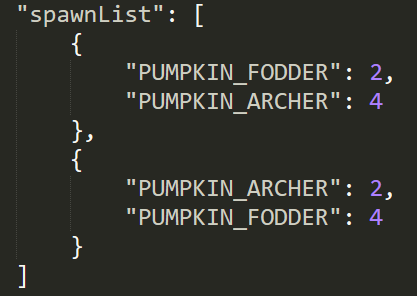
“spawnList” appears under both “waves” and “ambush”. It is List of enemy group that the game will pick at random when spawning. 
This means that the game will either spawn 2 FODDERS, 4 ARCHERS or 2 ARCHERS, 4 FODDERS.

Friday, October 19, 2018

v4.8 - Restraints and Devices


Patreon LINK.

Took a bit longer than expected, but I think it's worth it. First of all, restraints can now be applied on any vulnerable enemy as well instead of just on you/allies. You can of course, pickup any restrained units and place them wherever inside the dungeon. No, you can not take them out of the dungeon (yet). Of course, if you are trying to "speedrun," I dont think this is very efficient.

The second thing is that it took sometime to get the AI for "Pickup, and then carrying them to a Device" to work properly. Lots of problems that had be to solved, but its working now! In the process, I basically rewrote the entire "Decision-Making AI" (there are several AIs) so there might be some differences in behaviors and/or bugs than the previous versions. So make sure to report bugs!

Changelogs

      - implemented new weapon group - flasks(grenades)
        -   they apply a AOE effect that effects foes and allies on impact
        -   currently, there are 3 different flasks: gas, flash and impact
        - implemented masterbuation mechanics
        - added 4 different masterbuation animations, 2 for having penis and 2 for no penis
        - implemented restraints
        -   to restraint someone, first acquire the equipable restraint item
        -   then equip it and press E/LMB to use on appropriate target
        - implemented carrying
        -   to carry someone, they must be restrained first
        - implemented (Deviant?) Devices
        -   to use yourself, simply interact with the device
        -   to place someone else there, interact with the device while carrying whoever you want to put onto the device
        - fixed weapon refine level (+1, +2..) not giving bonuses
        - fixed a bug that prevent demon_wings from appearing in shops
        - decreased the amount of exp shared with party members with bigger party sizes
        - increased effectiveness of punishment/humil move against enemies (and only against enemies)
        - fixed the bald spot in hair005
        - added "longbow" to the game
        - HP recover from rescuing reduced from 50% to 25% of max hp
        - you can no longer use hoe/water_can/seed as weapon
        - for weapons without attacks (such as restraints & farming tools) you can use the LMB inplace where the interact key (E) is appropriate
        - rewrote the Decision-AI (there are several AIs, such as for combat, for navigation, etc) to support the restraint + carry mechanics
        - fixed a combat AI bug that makes the AI pick the first eligible target rather than pick a "best" target from a pool

Monday, October 15, 2018

Patch Preview

I was working on the stuff I mentioned in the previous post, and I thought I would be able to get a build out this week. But unfortunately that fell a little short, so we'll have to make due with a patch preview instead.

Some people are probably a little disappointed with the removal of (dungeon) traps. However, I think given the feedback on annoyance of tripwires and spikes, my assessment that the traps doesn't fit well with rest of the game is correct. So there wouldn't be any more "disabling" traps than what currently exists.

I do like the lewd gas idea tho and I think it fits well within the context of the game. But it actually requires some work. I designed the "grab" system to work on a Many to One relationship - multiple attackers, and one victim. Unfortunately the Many part didn't account for zero attackers so had to implement "selfies" functionality.


Furthermore, I shifted the delivery mechanism of lewd gases, from invisible traps, to hand-held "grenades." There is now a new weapon class - thrown flasks (grenades) that does various effects on impact. Emitting a cloud of lewd gas being one of them:


How this works is that units inside the gas (friend or foe) will have their heat increased. And should it fill to full, characters will be overcome by their desire and start playing with themselves.

One idea I want to try with the flasks is effects that affects friends and foe alike. The gas flask being one example. There are two more flask types available next patch: the flash flask which emits a blinding light that disables units in a large area for some time; and the shockwave flask that have a very strong knock back effect.

I also added a longbow weapon type. Its nothing fancy, but it's meant for players that want to play with a more "sniper-like" ranged weaponry. Compared to the short-bow, the longbow have lower rate of fire, but inflict greater damage per shot so it has a better ammo efficiency.


Now, onto the restraints and (holding) "Devices"

The way how restraints work is for players, there is a new equitable item type, restraints. When this is equipped, "Talk To" are replaced with "Tie Up." And it does exactly what it sounds. Once a unit is tied, you will have a new option - "Carry" where you will pickup the restrained unit, carry her, and potentially place her into a holding device.


Now, originally, I want the restraint to work on any grabbable foe as well. But unfortunately, this implementation interferes with the exp reward system, loot system and the auto-despawn system. I don't have a good solution atm so instead, the restraint on enemies only works on defeated uniques, which meant only a couple of enemies are susceptible atm. I consider this a flaw and I wish to address it somehow in the future, and hopefully making restraints applicable on all enemy types.


Finally, the holding devices. This actually took sometime as well because I had to upgrade the grab system (again) to account for not only character + character grabs/animations, but "device" + character grabs/animations as well. (And "device" + victim + attacker(s) in the future) I'll spare you the details but that works now.

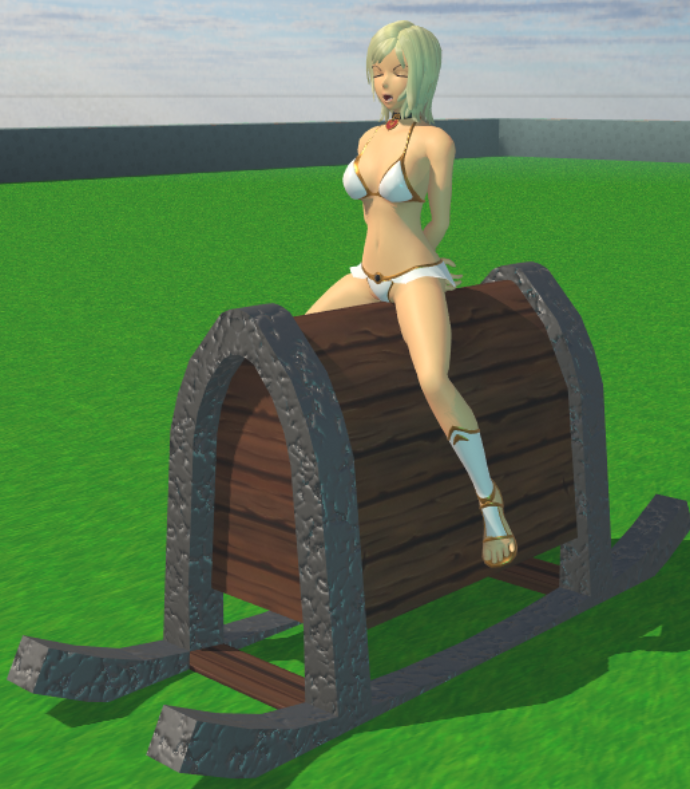
Currently, there are 6 different (holding) devices (P.S. if anyone got a suggestion on a better name for this, let me know!). Originally, I thought most of the devices would be "active," that is, they continuous inflict heat damage upon the holdee. But I thought it would be nice to have some "passive" devices as well, that just hold the character there.


On the currently implementation, only the Player can free themselves out of a holding device whereas all Non-Player-Characters will be held forever until they are freed. Maybe eventually, there could be a "fun cave" kind of area and the Player will lose the auto escape privilege as well.

Obviously, this device mechanic can go a lot further. For example, tentacles, magical hands, other autonomous drills can be done with the same implementation. Perhaps having other characters being able to perform Device-specific grabs/animations with the holdee as well. Of course, temporary "summons" can be done as well. I did some experimental stuff withe the above ideas, that isn't game ready but really shows promise.


Another new feature, is custom dungeon mod with custom enemies. But I will postpone this particular feature and explanation/example to the bugfix build after, as history indicate that the next feature build will likely have a couple bugs.

So, ETA on next build. Plan is middle next week to sort out some kinks, and potentially add a few more Devices as well. Adding new devices is kind of "easy": most just model + animation work now that the hard implementation part is done. For the really eager modders: I would like some time with the system to see how everything works/make adjustments and I'll open up modding for custom devices to a later date.


Friday, September 21, 2018

All Tied Up

A while back on the topic of (dungeon) traps I mentioned I abandoned lewd traps for something better. Quite a few people asked what that something is, so here is an explanation.

NOTE: Still all WIP and subject to change.

From early on in development, one feature that I wanted in game is in-combat grabs and allies. Overall I’m quite happy with the current system, with one exception: when you outnumber the enemy. When you have allies with you, the grab is more detrimental to the enemy than against your party. As overpowered as the divine battle dress big fister is, she is no match for a group of three (or more) - she spends too much time on grabbing a single unit when the player can utilize this “downtime” to basically, fully recover the other members of the party. This is why for the first real boss, he had to have a summon minions ability else I fear he would suffer the same fate.

One possible solution is to increase the penalties of grab or make rezzes more difficult. That is something I don’t want to do because I feel it goes against the nature of the game. But I do want to do something to address the situation so I can design encounters without always resorting to a large number of enemies.

I had an idea. The reason the adds are necessary, is not because of the swarm factor, but it alleviates the more powerful units (such as Ludas) from doing the grabs themselves (and “stuns” himself for the duration). So, if the game allows a unit to be put into an animation without always needing a “partner,” then similar results can be achieved. This is why I went with the (dungeon) traps idea - to implement an engine feature to have “animations” with the “environment.”

Ultimately, I abandoned the lewd traps because it is not a very fun mechanic to play against. I have a better idea:

Interactable Traps/Objects. Or Curios in the darkest dungeon for those that are familiar with that game. Basically, randomly placeable objects found in dungeons which the player/ally can interact with. And then, depending on chance, either give a reward, or an “animation” ensues.


The advantage of this over traps is that it does not interrupt the normal game play. When you are trying to fight, having an invisible trap activate underneath you and disables you for a long time sucks. However, those that are actively seeking game overs, you can still do the same.

The second part is restraints. So there will be a new equippable item class - “restraints.” Units with restraints equippable will be able to, well, restraint any downed foes. Restrained units need to break free of their bonds before they are able to do anything else. The duration is probably going to be dependant on the type and strength of the item versus the stat of the unit. The restraints must be removed first before the unit can be helped up (by allies).


A little aside here. So, bondage is a fetish that was requested a long time ago. And the suggestions were quite involved. For example, binding the feet would change the walking/running animation to something else, and binding the arms would gave the character a different attack. I actually did gave this kind of bondage a try back in August. My conclusion is that it takes too much time for a game that needs to be fully animated (and possibly deal with non-humanoids in the future). If this was a text game or had a simpler combat system, I believe I could do it, but alas, we are not. So the only kind of bondage that is feasible for me to implement is a fully disabled state as I described above.

I would like restraints to enable special grabs but it isn’t planned for the initial release.

The second feature of restraints, is that it allows for restrained foes to be carried. This enables a lot of possibilities, for example kidnapping an ally, or taking someone back with you from the dungeon. But for the first release, what I want to do is the ability for some enemies to carry bound units to the special trap objects/machinery found in the dungeon (the Curios), and places them there.


So in short, I am working on 1) Trap Objects/Curios (if someone can suggest a name for this kind of thing, let me know) 2) bondage 3) carrying units. I believe this entire system, when working in unison, is superior to the lewd traps approach. None of the annoying surprises, allows for a wide variety of “animations” and objects that are easily accessible if you wish, and gives the player a clear indication of what's going on and possible counter play.

Sunday, September 16, 2018

v4.7.3 Futa Dungeon and Modified items!

Patreon LINK.

V4.73 is here! In this patch, there is now a (temporary?) futa dungeon with futa-only enemies. If that is not your thing, do not enter! In addition, the equipment system is expanded to include modified items. They appear in blue and gold and can have various bonuses. Currently, they can only be acquired via drops and loot in containers. Furthermore, added a "Life Powder" that grants an Area Of Effect heal so you can heal your allies with 1 click/button press. Purchasable in the Village. Finally, the respawning waves in dungeons is tweaked so different waves wouldn't pile on top of one another. The Goblin Horde wasn't intentional, oops.

full changelog:

        - added a (temporary?) Futa Dungeon with futa enemies only.
        - enemies and containers may now drop enchanted (+1, +2...) and modified (Sharp Sword of Slaying, etc) items
        - changed the item drop algorithm to allow for a wider possibility of items to be dropped from each mod/container
        - added a "life_powder" item that can heal your team.
        - fixed a bug in the stats UI that allows for infinite EXP gain
        - reduced damage of rocks
        - WIL stat now gives 1 poise (aka hyper armor) per point
        - fixed bug that made it impossible to block when attacks are bouncing off due to deflection (blocks have higher priority than deflection now)
        - it is now possible to find ranged ammo in containers within the dungeon
        - tracking projectiles will now lose tracking if the angle between their heading and target is greater than 90 degrees (eg. if you roll through it)
        - waves should now only start spawning when the previous wave is dealt with
        - fixed a pathfinding bug that caused units to get stuck on crates and etc
        - Fully using consumables (to 0) will no longer shift the entire inventory over
        - Fixed bug that cause potential ally say that they join in camp when they actually dont
        - Increased the spawn rate of potential allies (again)
        - Cast_Curse cast time from 3.0 sec to 5.0 sec
        - HP gain from levels from 5% per lvl to 2% per lvl as high lvl units is a bit too spongy (CON is still 5%/pt)
        - fixed a bug that caused unique item data (such as enchantment lvl) to be reset upon equip/unequipping
        - fixed bug with sometimes EXP is not awarded and sometimes EXP is awarded more than once
        - fixed bug with loots disappearing in the lootbag when many units are KOed together

Saturday, September 8, 2018

v4.7.2 MORE FIXES

Patreon LINK.


V4.7.2 is up! Upgrading is strongly encouraged because there are some very severe game-breaking bugs with 4.7 and 4.7.1. Once upgraded, I recommend never touch v4.7 and 4.7.1 again. 

Changelogs:

    - added a reset_potion to Alchemist that can reset level back to level 1
        - AI is now more likely to participate in offensive threesomes+
        - fixed bug that cause your party members to disappear when asking a camp party to join you when you dont have enough CP
        - fixed bug with unique enemies not dropping loot
        - fixed bug with mouse lock/unlock state not updating properly when opening/closing UI elems
        - greatly increased the amount of gold each merchant have
        - changed description for damage scaling stats
        - fixed end of floor enemies giving a lot more EXP than intended
        - EXP gained from enemy cumming reduced from x2.5 to x2.0
        - Increased EXP gain when enemy is defeated by an ally
        - price of Futa Potion reduced from 3000 to 1500
        - price of Yuri Potion reduced from 500 to 300
        - root_fruits sell price increased from 10 to 20
        - root_fruit seeds price reduced from 5 to 2
        - collision checks & physics are disabled when in grab (prevents shaking on non-flat terrain)
        - increased drop rate for equipment for non-unique mobs slightly
        - Player will now actually strip when the strip prompt is shown rather than pick at random
        - increased the likelihood of meeting a potential ally in dungeon to compensate for the removal of potential ally on first room
        - disabled camera collision check vs non-flat terrain until a better solution is found
        - HP regeneration is now percentage based instead of flat based during grabs (so you dont get penalized for lvling up)